ReviewVivo X21, first smartphone with fingerprint sensor under screen, is a thing of wonder
You can’t believe its real for the first few hours – a gentle finger press is all it takes to unlock this iPhoneX clone from Chinese firm that’s beaten Samsung to the punch. Here’s the thing, though: you might prefer Vivo’s old-tech V9

Speculation was rampant ahead of the launch of the iPhoneX that it would feature an “invisible” Touch ID fingerprint sensor embedded underneath its screen. It didn’t happen, and Apple has since denied ever considering going down that route, but it’s open knowledge that Samsung really wanted to feature the technology on its Galaxy S8 before accepting it just wasn’t ready.
Well, it’s ready now and, surprisingly, Chinese brand Vivo got there first with the recent release of the X21 smartphone.
Here’s how the technology works: the fingerprint sensor, which until now has been housed on a bottom bezel or the back of a phone, is placed underneath an OLED display panel (it would not work on an LCD panel because that is thicker and requires a backlight), where it scans a user’s fingerprint via the tiny gaps between each individual pixel of the display panel.
The process of registering a fingerprint on the X21 is the same as on any other phone – I had to repeatedly place my finger on the sensor area and then lift it – except that it took twice as long. Once registered, the X21’s screen will display a circular area indicating where the sensor is underneath the display whenever the phone is locked or in apps that require fingerprint authentication.
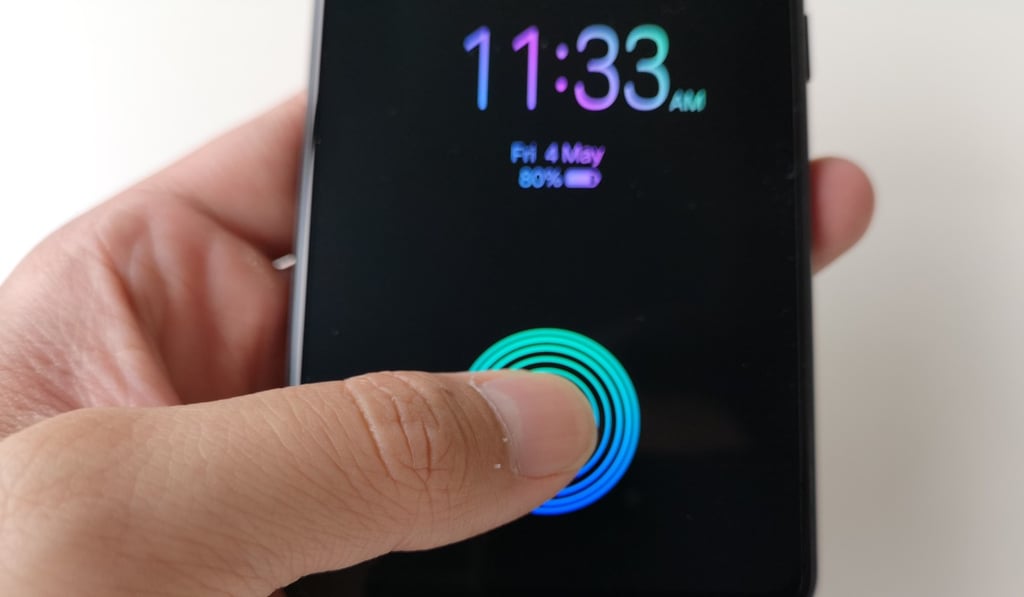
During my first couple of hours of testing I couldn’t quite believe my eyes: I was able to unlock the X21 just by placing my thumb gently on the display – though I must say the scanning process is quite slow, at about half a second.